文档网站搭建
快速搭建一个自己项目的“官方文档”网站
- 框架示意图
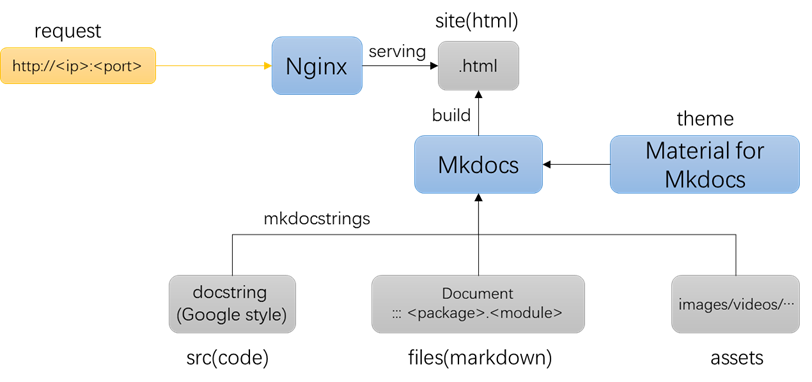
- 样例代码
- 样例代码目录
.
├── docs
│   ├── api_reference
│   │   ├── auth_service.md
│   │   ├── exception.md
│   │   ├── index.md
│   │   ├── role_service.md
│   │   └── user_service.md
│   ├── assets
│   │   ├── images
│   │   │   └── test.png
│   │   └── videos
│   │       └── test.mp4
│   ├── concepts
│   │   ├── authentication.md
│   │   └── user.md
│   ├── examples
│   │   └── user_crud.md
│   ├── about.md
│   ├── index.md
│   ├── quickstart.md
│   ├── release_notes.md
│   └── test.md
├── src
│   └── user_manager
│       ├── __init__.py
│       ├── exceptions.py
│       ├── models
│       │   ├── __init__.py
│       │   ├── role.py
│       │   ├── token.py
│       │   └── user.py
│       └── services
│           ├── __init__.py
│           ├── auth_service.py
│           ├── role_service.py
│           └── user_service.py
├── examples
│   ├── basic_usage.py
│   └── user_crud.py
├── tests
│   ├── main.py
│   ├── test_auth_service.py
│   └── test_user_service.py
├── .gitignore
├── mkdocs.yml
├── pyproject.toml
├── pytest.ini
└── readme.md
1. 官方文档内容
- 参考
- AutoGen:https://microsoft.github.io/autogen/stable/index.html
- Pytorch:https://docs.pytorch.org/docs/stable/index.html
- Transformers:https://huggingface.co/docs/transformers/index
-
Numpy:https://numpy.org/doc/stable/user/index.html
-
官方文档大致包含以下几块内容
- 用户指南(User Guide)
- API 参考文档(API reference)
- 发行说明(Release Notes)
- 用户指南应包含以下几部分核心内容:
- 快速开始(Quick Start)
- 主要功能说明
- 安装
- 一个简单的样例:用于验证安装成功,为用户上手提供最基础的支点
- 核心概念
- 代码框架中的核心类(模块)
- 核心类之间的交互方式
- 样例(Example)
- API 参考文档
- 通常由代码注释直接生成
- 按照源码的层级结构进行
- 通常一个类或者一个模块作为一个网页
- 每个函数接口对应的文档
- 功能描述
- 输入
- 输出
- 样例(特别是面向用户的关键接口)
- 异常(可选)
2. Python文档字符串
2.1 风格种类
-
Python的docstring格式主要有3种:
-
Google
-
Numpy
-
Sphinx
推荐 Google 风格
- Google 风格
def example_function(param1: int, param2: str) -> bool:
    """Example function with types documented in the docstring.

    Args:
        param1 (int): The first parameter.
        param2 (str): The second parameter.

    Returns:
        bool: The return value. True for success, False otherwise.

    Raises:
        ValueError: If param1 is negative.
    """
- Numpy 风格
def example_function(param1, param2):
    """Example function with NumPy-style docstring.

    Extended summary can go here.

    Parameters
    ----------
    param1 : int
        The first parameter.
    param2 : str
        The second parameter.

    Returns
    -------
    bool
        The return value. True for success, False otherwise.

    Raises
    ------
    ValueError
        If param1 is negative.
    """
- Sphinx 风格
def example_function(param1, param2):
    """Example function with Sphinx-style docstring.

    :param param1: The first parameter.
    :type param1: int
    :param param2: The second parameter.
    :type param2: str
    :returns: The return value.
    :rtype: bool
    :raises ValueError: If param1 is negative.
    """
2.2 Google 风格
2.2.1 介绍
- Google代码编写规范:https://google.github.io/styleguide/
Google代码编写规范-Python注释:https://google.github.io/styleguide/pyguide.html#38-comments-and-docstrings
-
Google代码编写规范中支持的关键字有:
-
Attributes
- Args
- Returns
- Yields
-
Raises
-
经过第三方扩展后的关键字
-
Examples
-
Notes
-
Warning
-
See Also
2.2.2 样例
(Qwen生成)涉及常用的情况:
- 类属性
- 对象属性
- 类方法
- 对象方法(同步、异步)
- 静态方法
- @property装饰
from typing import Iterable, Generator, AsyncIterable, AsyncGenerator
import asyncio

class CoordinateParser:
    """A utility class for parsing coordinate strings into (x, y) float pairs.

    This class provides one-off, batch, asynchronous, validation, and introspection
    utilities for coordinate strings in the format 'x,y'.

    Class Attributes:
        - DEFAULT_SEPARATOR (str): The expected separator between x and y values. Defaults to ','.
        - ALLOWED_WHITESPACE (bool): Indicates that surrounding whitespace is permitted and stripped.

    Attributes:
        separator (str): The character used to split x and y. Set at initialization.

    Note:
        This class does not validate whether coordinates fall within any specific
        geographic or application-specific bounds (e.g., latitude/longitude ranges).
        It only ensures syntactic correctness of the input format.

    Warning:
        Passing user-provided input without sanitization may lead to unexpected
        ``ValueError`` exceptions if the format is malformed. Always validate or
        catch exceptions in production code when the input source is untrusted.

    See Also:
        - func `json.loads`: For parsing structured data that may include coordinates.
        - class `shapely.geometry.Point`: For geometric operations using parsed coordinates.
    """

    DEFAULT_SEPARATOR: str = ','
    ALLOWED_WHITESPACE: bool = True

    def __init__(self, separator: str = DEFAULT_SEPARATOR):
        """Initialize a CoordinateParser instance.

        Args:
            separator: The character used to separate x and y in input strings.
                Defaults to ','.
        """
        self.separator = separator

    @classmethod
    def parse(cls, coord_str: str) -> tuple[float, float]:
        """Parse a single coordinate string into an (x, y) tuple.

        Uses the default comma separator and strips whitespace.

        Args:
            coord_str: A string representing coordinates, e.g., '1.5, -2.3'.

        Returns:
            x: The horizontal coordinate as a float.
            y: The vertical coordinate as a float.

        Raises:
            ValueError: If the string does not contain exactly two comma-separated values.
            TypeError: If coord_str is not a string.
            ValueError: If either part cannot be converted to a float.

        Examples:
            >>> CoordinateParser.parse("3.14, -2.5")
            (3.14, -2.5)

            >>> CoordinateParser.parse(" 0 , 10 ")
            (0.0, 10.0)
        """
        if not isinstance(coord_str, str):
            raise TypeError("Input must be a string.")

        parts = coord_str.split(cls.DEFAULT_SEPARATOR)
        if len(parts) != 2:
            raise ValueError("Input must contain exactly two comma-separated values.")

        try:
            x = float(parts[0].strip())
            y = float(parts[1].strip())
        except ValueError as e:
            raise ValueError("Both parts must be valid numbers.") from e

        return x, y

    def parse_batch(self, coord_strings: Iterable[str]) -> Generator[tuple[float, float], None, None]:
        """Parse an iterable of coordinate strings, yielding (x, y) tuples one by one.

        Uses this instance's separator. Memory-efficient via lazy evaluation.

        Args:
            coord_strings: An iterable (e.g., list, generator) of coordinate strings.

        Yields:
            x: The horizontal coordinate as a float.
            y: The vertical coordinate as a float.

        Raises:
            ValueError: If any string does not contain exactly two values separated by
                this instance's separator.
            TypeError: If any item in coord_strings is not a string.
            ValueError: If any part cannot be converted to a float.

        Examples:
            >>> parser = CoordinateParser()
            >>> list(parser.parse_batch(["1,2", "3.5, -4"]))
            [(1.0, 2.0), (3.5, -4.0)]
        """
        for s in coord_strings:
            if not isinstance(s, str):
                raise TypeError("All inputs must be strings.")

            parts = s.split(self.separator)
            if len(parts) != 2:
                raise ValueError(
                    f"Input must contain exactly two {repr(self.separator)}-separated values."
                )

            try:
                x = float(parts[0].strip())
                y = float(parts[1].strip())
            except ValueError as e:
                raise ValueError("Both parts must be valid numbers.") from e

            yield x, y

    @staticmethod
    def is_valid_format(coord_str: str, separator: str = ',') -> bool:
        """Check if a string has the correct format to be a coordinate pair.

        This is a lightweight pre-check that verifies:
        - Input is a string
        - Contains exactly two parts when split by the separator
        - Does not attempt to validate numeric convertibility

        Args:
            coord_str: The candidate string to check.
            separator: The separator to use (default: ',').

        Returns:
            True if the string has exactly two parts after splitting; False otherwise.

        Examples:
            >>> CoordinateParser.is_valid_format("1.5,-2")
            True
            >>> CoordinateParser.is_valid_format("1,2,3")
            False
            >>> CoordinateParser.is_valid_format("abc")
            False
            >>> CoordinateParser.is_valid_format(123)
            False
        """
        if not isinstance(coord_str, str):
            return False
        parts = coord_str.split(separator)
        return len(parts) == 2

    async def parse_batch_async(
        self, coord_stream: AsyncIterable[str]
    ) -> AsyncGenerator[tuple[float, float], None]:
        """Asynchronously parse an async iterable of coordinate strings.

        Useful when coordinates are read from an async source (e.g., network stream,
        async file reader, or message queue).

        Args:
            coord_stream: An asynchronous iterable of coordinate strings.

        Yields:
            x: The horizontal coordinate as a float.
            y: The vertical coordinate as a float.

        Raises:
            ValueError: If any string is malformed (wrong number of parts or non-numeric).
            TypeError: If any item is not a string.

        Examples:
            >>> async def example():
            ...     async def gen():
            ...         yield "1,2"
            ...         yield "3.5, -4"
            ...     parser = CoordinateParser()
            ...     coords = [c async for c in parser.parse_batch_async(gen())]
            ...     return coords
            >>> asyncio.run(example())
            [(1.0, 2.0), (3.5, -4.0)]
        """
        async for s in coord_stream:
            if not isinstance(s, str):
                raise TypeError("All inputs must be strings.")

            parts = s.split(self.separator)
            if len(parts) != 2:
                raise ValueError(
                    f"Input must contain exactly two {repr(self.separator)}-separated values."
                )

            try:
                x = float(parts[0].strip())
                y = float(parts[1].strip())
            except ValueError as e:
                raise ValueError("Both parts must be valid numbers.") from e

            yield x, y

    @property
    def description(self) -> str:
        """Return a human-readable description of this parser's configuration.

        This property reflects the current separator and whitespace handling behavior.

        Returns:
            A string describing how this parser interprets input.

        Examples:
            >>> parser = CoordinateParser()
            >>> parser.description
            "Parses coordinate strings using separator ',' with whitespace stripping."

            >>> parser2 = CoordinateParser(separator=';')
            >>> parser2.description
            "Parses coordinate strings using separator ';' with whitespace stripping."
        """
        return (
            f"Parses coordinate strings using separator {repr(self.separator)} "
            f"with whitespace stripping."
        )
3. Mkdocs(Material主题)
3.1 介绍
-
关系说明
-
Mkdocs是一个快速搭建文档网站的开源框架
-
Material for Mkdocs是 Mkdocs的一个网站开源主题(theme)
- “material design” 是Google提出的一套前端UI设计框架,类似vue
-
mkdocstrings, mkdocs-video, ... 是Mkdocs框架的插件
-
官方文档
-
Mkdocs官方文档:https://www.mkdocs.org/
-
Material for Mkdocs 官方文档:https://squidfunk.github.io/mkdocs-material/reference/
- 主要设置点:https://squidfunk.github.io/mkdocs-material/setup/
-
mkdocs-video:https://pypi.org/project/mkdocs-video/
-
FastAPI官网采用了Material for Mkdocs主题
-
https://fastapi.tiangolo.com/
3.2 快速开始
- 安装
pip install mkdocs-material          # 会自动安装mkdocs框架相关

# 以下为搭建文档网站所需插件,
# 不属于Material for Mkdocs基础部分,但建议安装
pip install mkdocstrings[python] mkdocs-video
-
创建目录和对应文件
-
目录
-
对应文件
- index.md
- hello.md
- mkdocs.yml
-
启动
输出
INFO    -  Building documentation...
INFO    -  Cleaning site directory
INFO    -  Documentation built in 0.12 seconds
INFO    -  [17:00:31] Serving on http://127.0.0.1:8000/
- 网页效果
3.3 文档编写
3.3.1 代码文档引用
(按照包导入方式)
例如
3.3.2 视频插入
- markdown未提供视频插入语法
mkdocs build将markdown生成html后(site文件夹中),资源路径会发生变化。
- 针对markdown语法涉及的路径(如图片)会自动处理
-
非markdown语法中涉及的路径则不调整
-
方式一:使用 HTML 标签
需要自行处理视频路径
<video width="100%" controls>
  <source src="../assets/videos/test.mp4" type="video/mp4">
  你的浏览器不支持 video 标签
</video>
- 方式二:使用 Markdown 语法
基于mkdocs-video插件,会自动处理视频路径
-
在
mkdocs.yml中添加配置 -
使用方式
3.4 编写配置
mkdocs.yml编写规则
3.4.1 导航目录
- 可支撑多级目录结构
nav:
  - Home: index.md
  - User Guide:
      - Quickstart: quickstart.md
      - Examples:
          - user crud: examples/user_crud.md
  - API reference:
    - Introduction: api_reference/index.md
    - UserService: api_reference/user_service.md
    - AuthService: api_reference/auth_service.md
    - RoleService: api_reference/role_service.md
    - Exception: api_reference/exception.md

  - Releases: release_notes.md
  - About: about.md
  - 测试: test.md
若不使用其他设置,全部目录均在左侧导航栏中
- 可添加设置
theme:
  name: material
  features:
    - navigation.tabs             # 启用标签式导航(一级目录)
    - navigation.sections         # 启用分节导航(二级目录)
之后各级目录则不受影响
3.4.2 样例配置
site_name: My Project Docs

# 仓库链接相关设置
repo_name: a171232886/Note_Python
repo_url: https://github.com/a171232886/Note_Python

# 导航栏设置
nav:
  - Home: index.md
  - User Guide:
      - Quickstart: quickstart.md
      - Concepts:
          - Users: concepts/user.md
          - Authentication: concepts/authentication.md
      - Examples:
          - user crud: examples/user_crud.md
  - API reference:
    - Introduction: api_reference/index.md
    - UserService: api_reference/user_service.md
    - AuthService: api_reference/auth_service.md
    - RoleService: api_reference/role_service.md
    - Exception: api_reference/exception.md

  - Releases: release_notes.md
  - About: about.md
  - 测试: test.md

# 网站风格相关
theme:
  name: material
  features:
    - navigation.instant          # 即时加载页面
    - navigation.tabs             # 启用标签式导航
    - navigation.tabs.sticky      # 粘性标签导航
    - navigation.sections         # 启用分节导航
    - navigation.tracking         # URL 跟踪
    - navigation.footer           # 启用页脚导航
    - content.code.select         # 代码行选择按钮
    - content.code.copy           # 代码复制按钮
    - search.highlight            # 高亮搜索结果

  # 亮暗模式设置
  palette:
    # Palette toggle for automatic mode
    - media: "(prefers-color-scheme)"
      toggle:
        icon: material/brightness-auto
        name: Switch to light mode

    # Palette toggle for light mode
    - media: "(prefers-color-scheme: light)"
      scheme: default
      toggle:
        icon: material/brightness-7
        name: Switch to dark mode

    # Palette toggle for dark mode
    - media: "(prefers-color-scheme: dark)"
      scheme: slate
      toggle:
        icon: material/brightness-4
        name: Switch to system preference

  # 图标设置
  icon:
    logo: material/home
    repo: fontawesome/brands/git-alt

copyright: Copyright © 2026 - 2025 WH      # 页脚版权信息
extra:
  generator: false      # 关闭底部的 MkDocs 生成标志

# 插件设置
plugins:
  - search
  - mkdocs-video:
      is_video: True
      video_muted: True
      video_controls: True
      css_style:
        width: "50%"
  - mkdocstrings:
      handlers:
        python:
          paths: [src/user_manager]
          options:
            members_order: source
            docstring_style: google
            show_root_heading: true         # 为顶级对象生成标题
            show_symbol_type_heading: true  # 为不同类型doc生成类型标志(func,class,meth...)
            show_source: false              # 不显示源码链接
            separate_signature: True        # 将函数名与描述分开

markdown_extensions:
  # 代码块显示效果设置
  - pymdownx.highlight:
      anchor_linenums: true
      line_spans: __span
      pygments_lang_class: true
  - pymdownx.inlinehilite
  - pymdownx.snippets
  - pymdownx.superfences

  # 扩展语法
  - admonition
  - pymdownx.details
  - pymdownx.superfences
注:对中文检索支持有限,material for mkdocs正在考虑将jieba分词加入项目中
4. Nginx
使用Nginx部署静态资源网站
4.1 配置
- 安装
- 添加代理设置
server {
    listen 9081;                             # 使用本机的9081端口
    server_name _;                               # 没有域名,直接留空
    root /home/wh/code/api_generate/site;        # 对应的网站文件夹
    index index.html index.htm;

    location / {
        try_files $uri $uri/ =404;
    }
}
- 启用站点,创建软连接
- 检查nginx状态
nginx: the configuration file /etc/nginx/nginx.conf syntax is ok
nginx: configuration file /etc/nginx/nginx.conf test is successful
- 重启nginx
- 调整防火墙
查看防火墙状态
4.2 常见问题
如遇访问权限问题,
-
可尝试对网站文件夹读写权限变成755
-
或可尝试在
/etc/nginx/nginx.conf的第一行,将user www-data改为user <当前用户名>,(存在安全隐患)
然后重启nginx
5. Dockerfile
创建一个自动部署网页的镜像
FROM nginx:alpine

WORKDIR /site
ENV PORT=9082

RUN chmod -R 755 /site
RUN cat > /etc/nginx/conf.d/default.conf << 'EOF'
server {
    listen 9082;
    server_name _;
    root /site;
    index index.html index.htm;

    location / {
        try_files $uri $uri/ =404;
    }
}
EOF

RUN cat > /start.sh << 'EOF'
#!/bin/sh
chmod -R 755 /site
# 以前台模式运行 Nginx,防止容器退出
nginx -g 'daemon off;'
EOF

RUN chmod +x /start.sh

EXPOSE ${PORT}
CMD ["/start.sh"]
构建镜像
运行容器